


Logistics Integration Services for Fleets, Brokers and 3PLs
Connect the TMS, warehouse, fleet, EDI and accounting systems you already run, with every record checked before it moves.
Built for
- Carriers and fleets
- Freight brokers
- 3PLs and warehouses
- Final-mile and courier
- Amazon Delivery Service Partners
- FedEx Ground contractors

 Delivered Loads
 Invoices by Truck
 Driver Hours
 Payroll by Route
 Client Orders
 Warehouse Picks
 Fuel ChargesFuel by Truck
Connected overAPIFile exportSFTPEDI

 SOC 2 Type II
Can You Integrate Your TMS With Your ELD, Warehouse, EDI and Accounting Systems?
Yes, you can integrate your TMS with your ELD and telematics, your warehouse system, EDI trading partners, payroll and QuickBooks, Xero or NetSuite using Autymate. Each connection runs over API, file, SFTP or EDI, on a schedule you set. Every record is checked before it moves, and anything Autymate is unsure about waits for review with the reason. It works with 300+ other tools.
 Autymate on every line: fields mapped, each record checked, anything unsure held


 McLeod, Rose Rocket, AscendTMS, Alvys or another
Logistics API Integration for the Software You Already Run
Dispatch, trucks, warehouses, payroll and the books each run their own software. Autymate connects all of them.
Logistics API integration connects the systems a carrier, broker or 3PL runs, so data moves between them without re-keying. Autymate connects TMS, ELD, warehouse, payroll, CRM and accounting systems over each system's API, and over file exports, SFTP or EDI where an API isn't available. Each connection maps the fields both systems use, checks every record and holds anything unsure for review.
| TMS and dispatch | McLeodRose RocketAscendTMSAlvys AljexTailwind TMS AljexTailwind TMS |
|---|---|
| ELD and telematics | Samsara Motive Motive GeotabNetradyne GeotabNetradyne GroundCloud GroundCloud |
| Warehouse and 3PL | Extensiv ShipHero ShipHero Logiwa Logiwa |
| Load boards |  DAT DAT Truckstop Truckstop |
| Fuel cards | WEX ComdataEFS ComdataEFS |
| Payroll | ADP FleetWage FleetWage Paycom Paycom |
| CRM |  Salesforce Salesforce HubSpot HubSpot |
| Accounting and ERP |  QuickBooks OnlineQuickBooks Desktop QuickBooks OnlineQuickBooks Desktop Xero Xero Sage Intacct Sage Intacct Oracle NetSuite Oracle NetSuite |
- APILive data from systems that publish one
- File exportCSV or spreadsheet exports, on a schedule
- SFTPFiles dropped and picked up securely
- EDIMessages exchanged with trading partners
Autymate builds and maintains the integrations between these systems. It isn't a TMS, a WMS, a factor or an IFTA tool, so dispatch, the warehouse floor and your accountant keep the software they know. If a system isn't listed, Autymate builds the integration wherever it offers an API, an export, SFTP or EDI.
WMS and 3PL Integration With Stores, ERPs and Carriers
Orders come in from every client's store. Shipments, inventory and billing have to go back out.
A 3PL integration connects the warehouse management system to each client's store or ERP, to carriers and to billing. Autymate brings orders into the WMS from Shopify, Amazon or a client's ERP, sends shipment confirmations, tracking and inventory back, and turns storage, pick-and-pack and shipping charges into invoices in the books, client by client. Each client keeps its own connection, on the same rules.
The leaks show up in the gaps: an order that never reached the floor, a confirmation sent back late, a storage charge that never made the invoice. Connecting billing to the WMS is how every charge reaches the client. For warehouse integrations built around an ERP, see ERP integration services.
- 1OrdersClient store or ERPWMS
- 2Shipment confirmations and trackingWMSClient store
- 3Inventory levelsWMSEvery sales channel
- 4Storage, pick and pack, and shipping chargesWMSClient invoices in the books
Truck 114 · yesterdayFrom the ELD- On-duty hours10.5 hPayroll, by driver
- Miles driven512 miThe books, by truck
- Stops completed14 of 14The TMS and the shipper
- Fuel bought74 galFuel expense, by truck
Illustrative figures for one truck's day.
Fleet Software Integrations: ELD and Telematics Data Where It Is Needed
The truck already knows its hours, miles and stops. Payroll, dispatch and the books should too.
Fleet software integrations move ELD and telematics data from Samsara, Motive or Geotab to the systems that need it: hours and stops to payroll, miles and fuel to the books by truck, and status to the TMS. Autymate maps each truck and driver ID to the matching record in the other system, and holds any ID it can't match instead of guessing.
Fuel-card charges from WEX, Comdata or EFS follow the same rule, landing as fuel expense against the truck that bought the fuel. Maintenance and repair costs can follow the truck the same way, so each unit carries its own costs in the books.
What Is EDI in Logistics, and Where Should the Data Go?
Shippers send loads, status requests and invoices as EDI. Your TMS and books need them as records.
EDI in logistics is the standard format shippers, brokers and carriers use to exchange load tenders (204), tender responses (990), shipment status updates (214) and freight invoices (210). The value comes from what happens after a message arrives: the tender has to become a load in the TMS, and the invoice has to reach the books. Autymate connects over EDI as well as API, file and SFTP, and moves that data where it belongs.
What the shipper sends: an EDI 204
- ST*204*0001~A load tender begins
- B2***CARR**48213**PP~Shipment 48213, prepaid
- S5*1*LD~Stop 1: load
- G62*69*20261001*U*0700~Pick up Oct 1, 7:00
- N1*SH*DALLAS DC~Shipper: Dallas DC
- S5*2*UL~Stop 2: unload
- N1*CN*MEMPHIS DC~Consignee: Memphis DC
- L3*38400*G***245000~38,400 lb, $2,450.00
What the TMS needs: a load
Load 48213 New in the TMS
- Pickup
- Dallas DC · Oct 1, 7:00
- Deliver
- Memphis DC
- Weight
- 38,400 lb
- Rate
- $2,450.00
| Message | What it carries | Where it should end up |
|---|---|---|
| 204Load tender | Pickup, stops, weights and rate | A new load in the TMS |
| 990Tender response | Accepted or declined | The shipper's answer |
| 214Shipment status | Picked up, in transit, delivered | The shipper's tracking |
| 210Freight invoice | Charges for the load | A receivable in the books |
Many carriers start EDI because one large shipper requires it, then find the messages stop at a portal. The integration work is the part after: turning each message into the record your TMS and your books expect. For EDI connected to an ERP, see ERP integration services.
QuickBooks for Trucking, With Every System Posting to the Books
Loads, fuel, settlements and factoring all reach QuickBooks by truck, route and company.
QuickBooks works for trucking once every system feeds it the same way. Autymate posts TMS invoices by truck and customer, fuel-card charges as fuel expense by truck, factor remittances against the invoices they pay, and weekly settlements as gross revenue with each deduction on its own line, net matched to the bank deposit. It works with QuickBooks Online and Desktop, and with Xero, Sage Intacct and NetSuite.
| Linehaul and stops | $14,280.00 | |
| Fuel surcharge | $1,120.00 | |
| Truck lease deduction | −$2,350.00 | |
| Insurance deduction | −$640.00 | |
| Fuel advance deduction | −$1,800.00 | |
| Bank deposit | Deposited | $10,610.00 |
|---|
Ties out
| What comes in | Where it usually lands | Why |
|---|---|---|
| A delivered load (TMS invoice) | Freight revenue, with the truck or route as the class | Each truck's revenue stays visible |
| A weekly settlement | Gross revenue, each deduction to its own expense, net to the deposit | The deposit ties out and revenue isn't understated |
| A fuel-card charge | Fuel expense, with the truck as the class | Fuel follows the truck that bought it |
| A factor remittance | Payment against the invoices it covers, the factoring fee as an expense | Receivables close invoice by invoice |
| Driver payroll | Wages by route or truck | Labor cost sits with the work |
| A truck or van lease | Equipment lease expense, by truck | Each truck carries its own cost |
A week of $15,400 in linehaul and fuel surcharge, less $4,790 in deductions, arrives as one $10,610 deposit. Book the deposit as revenue and the week looks $4,790 smaller than it was, with none of the costs recorded. Your accountant approves the mapping once; after that, every truck, route and company posts the same way, and month-end starts from books that already match the bank.
Accounting integration services QuickBooks Online integration
QuickBooks Online for Multiple Companies, One per MC, Terminal or Route
Each motor carrier, terminal or LLC keeps its own books. The rules for all of them stay the same.
QuickBooks Online keeps one company per subscription, so a logistics group with several MCs or LLCs usually runs several company files. Autymate posts each company's loads, fuel and payroll to its own file, and uses classes for trucks, routes or terminals inside a file, with the same mapping everywhere. Each owner and bookkeeper keeps their own login, and nothing has to move into a new accounting system.
- MC 1 · DallasIts own QuickBooks Online companyA class per truck, 101 to 118
- MC 2 · MemphisIts own QuickBooks Online companyA class per truck, 201 to 212
- Final-mile LLCA QuickBooks Desktop fileA class per route, 1 to 9
Class tracking does the rest inside each file: a class per truck, route or terminal, set once and used by every system that posts. A new company or terminal starts on the same mapping the day it opens.
Amazon Delivery Service Partners and FedEx Contractors: Payroll, Settlements and the Books
The network pays a weekly settlement. Drivers, vans and fuel are yours to manage, station by station.
Amazon Delivery Service Partners and FedEx Ground contractors run their routes on the network's systems, but the costs are theirs. Autymate connects GroundCloud, Netradyne or telematics data to payroll in FleetWage, ADP or Paycom, posts each weekly settlement to that station's or contract's books as gross revenue and deductions, and keeps every LLC in its own QuickBooks company on the same mapping.
Revenue is set by the network, so the margin is decided by payroll, vans and fuel. Keeping those costs in the right station's books starts with every station posting the same way.
- GroundCloudNetradyneRoutes, stops and hoursPayroll in FleetWage, ADP or Paycom
- SamsaraGeotabMiles and fuelEach van's costs in that station's books
- The network's statementThe weekly settlementGross, deductions and net, matched to the deposit
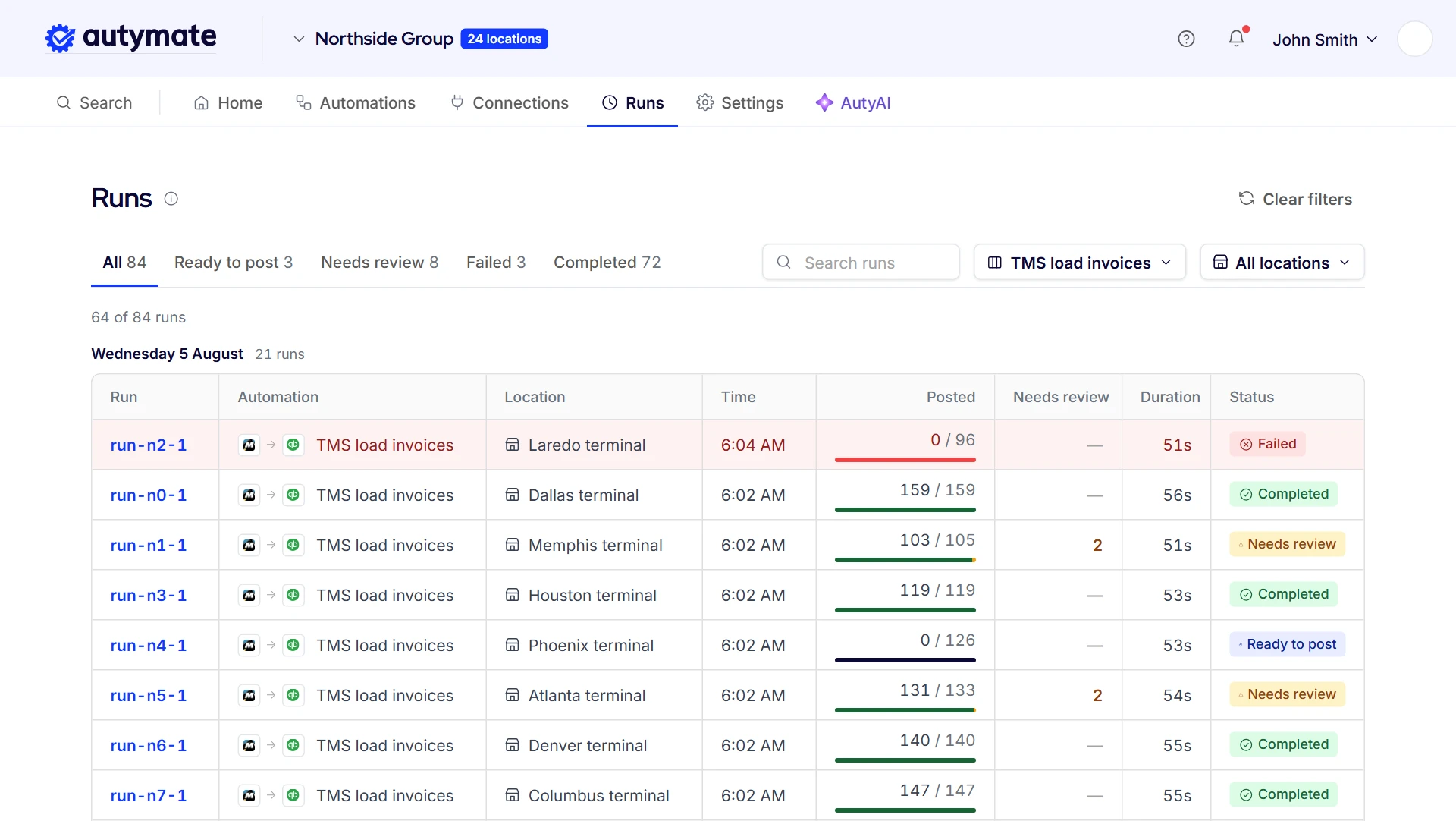
See What Posted, System by System, Before Anyone Asks
Nothing reaches the TMS, payroll or the books until it has been checked. Each run is listed on its own, by system and by company, with what posted, what is waiting and why. A load Autymate can't place, such as one with an unknown truck ID or a duplicate EDI invoice, waits in review with the reason in plain language, and the rest of the run carries on.
- Each system's and company's runs listed separately
- What posted, what is waiting and why
- Plain-language reasons for anything held
- Possible duplicates held, not posted twice
- Queued and retried runs shown
This is the question operators ask first: did it actually upload? Every run shows its result, so a bookkeeper or dispatcher can check yesterday's loads, hours and settlements without opening each system. Queued and retried runs show there too.
Logistics Integration Questions
No.
Dispatch keeps the TMS, the warehouse keeps its WMS, and the office keeps QuickBooks or whichever accounting system it runs. Autymate connects them and moves the data each one needs, on the mapping you approve. Replacing a TMS is the disruption most operators work hardest to avoid, and integration fixes the gaps between systems without it.
Yes.
Autymate builds and maintains the integration when a system isn't already listed, as long as it offers an API, a file export, SFTP or EDI. That covers most TMS, ELD, warehouse, fuel-card and payroll software. The new connection follows the same rules as every other one: fields mapped, every record checked, and anything unsure held for review.
Yes.
Autymate posts to QuickBooks Desktop as well as QuickBooks Online, which matters in trucking, where plenty of bookkeepers still keep Desktop files. It also posts to Xero, Sage Intacct and Oracle NetSuite. Each company posts to whichever edition or system it already uses, so nobody has to move their books to get the integration.
It waits for review instead of being guessed.
When a record from the ELD, the TMS or an EDI message carries an ID the other system doesn't recognize, Autymate holds that record with the reason in plain language and posts the rest of the run as normal. Someone on your team fixes the ID or the mapping once, and the record goes through.
Yes.
Brokers and carriers often quote in Salesforce or HubSpot and dispatch in the TMS. Autymate connects the two so customers, quotes and booked loads move between them, under the same rules as every other connection: each field matched and each record checked before it moves. A CRM integration follows the same build process as every other integration Autymate runs.
On the schedule you choose, and on demand whenever you need it.
Most operators move loads, hours and settlements daily, and some move invoices several times a day. Each run is listed with its result, so a missed or held run is visible the same day instead of at month-end, when it is much harder to trace.
Autymate does the most for operators running several systems or several companies: a TMS, an ELD, fuel cards, payroll and more than one set of books.
A single truck whose TMS already sends everything it needs to QuickBooks gets less from it. The more systems and companies you run, the more re-keying and checking an integration removes.
Yes.
Each store keeps its own point-of-sale system, such as ShipRite or PostalMate, and its own QuickBooks company or location, and posts daily sales on one mapping, often the franchisor's own. A new store starts on that same mapping the day it opens, so every store's books follow one set of rules without anyone re-keying the network's reports.
The Life of a Load, With Nothing Re-Keyed
From the shipper's tender to the bank deposit, Autymate moves each record to the next system and checks it first.
Load 48213, Dallas terminal: EDI tender to QuickBooks Online
Tender
The shipper's EDI tender becomes a load in your TMS.
ReplacesTyping loads in from email and portals
Haul
ELD hours, miles and stops reach payroll by driver and route.
ReplacesRebuilding driver pay from the ELD
Check
Anything with an unknown truck, driver or load ID waits with the reason.
ReplacesFinding mismatches at month-end
Invoice
The delivered load posts to the books by truck and customer.
ReplacesRe-keying invoices into QuickBooks
Get Paid
The factor's or shipper's payment is matched to the invoice it pays.
ReplacesMatching remittances by hand
The same flow at every terminal
- Dallas
- Memphis
- Atlanta
- Laredo
- Your terminals
Page notices
The examples on this page are illustrations. The load, truck, settlement and EDI figures show how the data moves; they are not customer data, and results depend on your own systems and setup.
QuickBooks and Intuit are trademarks of Intuit Inc. FedEx, Amazon, McLeod, Samsara, Motive, Geotab, GroundCloud, Netradyne, Extensiv, DAT, WEX, ADP, FleetWage, Salesforce, Shopify and the other names on this page are trademarks of their respective owners, used to identify the systems and networks our customers run. No endorsement or partnership is implied.