
Transfer Data from CSV Files To QuickBooks Online With Autymate Transactions Accounting Integration Software

Create your own integrations in minutes.
Popular CSV -- QuickBooks Online workflows.


Create Invoice in QuickBooks Online when a new File Upload is added to a folder in CSV/TSV
.svg)
Create Sales Receipt in QuickBooks Online when a new File Upload is added to a folder in CSV/TSV

Create Customer in QuickBooks Online when a new File Upload is added to a folder in CSV/TSV
Create Transfer in QuickBooks Online when a new File Upload is added to a folder in CSV/TSV
Create Bill in QuickBooks Online when a new File Upload is added to a folder in CSV/TSV
How it Works - 3 EASY Steps

Upload your File



Map your File
Use our template to map automatically

Preview and
Import File
You can make changes during this step


See the results in QuickBooks
See the results in QuickBooks

Why choose Autymate for Importing CSV data to QuickBooks Online
We’re here to help you make the most out of your existing IT infrastructure, while keeping costs low. Maintain your existing accounting systems and use Autymate to connect to QuickBooks Online to fill in the functional gaps.
When you automate more, you’ll gain more than just an ROI. You’ll give your executives, shareholders, employees, and most importantly, your customers, an amazing experience.
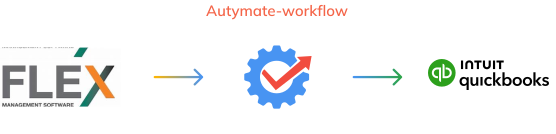
The Autymate solution can save you time and money by automating monthly sales exports from FLEX to QuickBooks Online.
Get Started.
Step 1: Choose One of the three options below.
You must purchase QuickBooks Online from this site to receive the Forever Discount.
Current QuickBooks
Desktop User
New to QuickBooks
Current QuickBooks
Online User
Current QuickBooks
Desktop User


Convert from QuickBooks Desktop to QuickBooks Online
Make the switch! Up to 15% off QuickBooks Online Forever, depending on the plan chosen.

New to QuickBooks

Purchase QuickBooks Online from Autymate, and get up to 15% off on your QuickBooks Online subscription forever!
Up to 15% off QuickBooks Online Forever, depending on the plan chosen.
Current QuickBooks
Online User
You may use your current QuickBooks Online account, however you will not take advantage of the Forever Discount. To proceed with using your current QuickBooks Online Account, go to step 2.
If you would like to take advantage of the Forever Discount, you will need a new QuickBooks Online account. This will require you to transfer your QuickBooks Online Data to the new account. Help Guide to transfer QuickBooks Online data."